Translation @ a click with Babylon

As a form of gratitude to Babylon I decided to write this post. A post is worth a thousand words almost literally in this case.

When it comes to computer translation, don’t think twice. Take a look at Babylon. Babylon is a Windows client application that resides in you taskbar. It offers translation from/to a varied set of language pairs.

If you are not a native English speaker as is my case and if you work in the software world, chances are that you had to resort to any online dictionary to find the meaning of some word. English reigns when it comes to programming languages and any other sort of computer related stuff. With Babylon the translation from/to English to a varied set of languages is just @ a click of the mouse. This amazing software product has helped me a lot since I started the computer engineering course in 2003 and I think it'll continue to play a big role in my English learning process during the years to come.

Nowadays it's practically impossible to work in the software industry without a grasp of English grammar, so that if you want to know a software product that can help you, read on.

Being a Brazilian speaking Portuguese and an avid user of Babylon since 2002 I can tell you that Babylon played and plays a big part in my English language learning. Despite having a 4.5 years course of English background, it’s always not enough. Learning is an infinite process.

Much of my contributions to ProZ comes from Babylon. At the same time I help others I learn a little bit more of English each day.
I just can’t express in words how much Babylon has helped me during these past years. At least this is an attempt.

Below is a screenshot of Babylon 8 with word auto-completion (auto-suggestion):

Babylon 8 - Main Window

When I get to a word that I don’t know yet I just select it with "Ctrl + Right Mouse Button" or copy/paste it inside Babylon’s text box to get instant translation that comes from a number of online dictionaries including Wikipedia, which is the world’s largest encyclopedia/source of information.

Babylon has its native dictionaries/glossaries but the community also develop custom ones making them free to use. Such dictionaries/glossaries are in most cases specialized ones, that is, they refer to specific fields as computer networks, software, electronics, etc. In contrast with free content, there is also premium content which you pay for.

Behind the curtains Babylon uses built-in browser functionalities as is the case of translated data returned in the form of a webpage and history navigation.

Besides translation to and from any language, full web page translation, full document translation (Word, PDF, Text), integration into Microsoft office spellers, leading dictionary packs - Oxford, Britannica, Merriam-Webster, etc, Babylon also does currency, measurements and time conversions. With that all, Babylon can be called a killer app.

I’d like to remember when exactly I started using Babylon and in which version it was, but that is a difficult task… Sometimes you get a little bit nostalgic.

Babylon has been evolving and in each new version new features get added and existing ones are refined. Version 8 in my humble opinion is fantastic!

Watch this video demo to see Babylon in action.

With Babylon there’s no more language barriers when it comes to read/written words. Take it with you and you can rest assured that you’ll have that word translated as fast as a mouse click.

Model View Presenter pattern with Castle in ASP.NET

This post shows how to implement the Model View Presenter (MVP) architectural pattern using Castle Project, which is an Inversion of Control Container framework. Castle Project has two IoC containers: MicroKernel and the Windsor Container.

Employing Castle Project containers and ASP.NET it turns out to be a simple task to have a Web App that takes advantage of the MVP pattern.

The simple approach I describe here is of great utility when you need a powerful and proven framework to develop your web applications based on Web Forms.

Let’s start with Solution Explorer inside Visual Studio 2008:

 MVP Web App Castle Project - Visual Studio Solution Explorer

In the following sections I’ll describe what role each file of the project plays…

Inversion of Control (IoC)
To implement the Inversion of Control principle, we define a static class called IoC as follows:

using System;
using Castle.Windsor;

namespace MvpWebAppCastleProject
{
    public static class IoC
    {
        private static IWindsorContainer container;

        public static void Initialize(IWindsorContainer aContainer)
        {
            container = aContainer;
        }

        public static T Resolve<T>()
        {
            try
            {
                return container.Resolve<T>();
            }
            catch(Exception e)
            {
                throw e;
            }
        }
    }
}

The container has a generic method Resolve<T> responsible for resolving at runtime the right component of your project to use.

Global.asax
In the Global.asax.cs code-behind file we initialize the IoC contatiner inside the Application_Start method:

using System;
using System.Web;

namespace MvpWebAppCastleProject
{
    public class Global : HttpApplication
    {
        protected void Application_Start(object sender, EventArgs e)
        {
            IoC.Initialize(new BusinessContainer());
        }
    }
}

As you see, a new instance of the class BusinessContainer is passed to the IoC.Initialize method. BusinessContainer is a custom made container that inherits from WindsorContainer:

using Castle.Core;
using Castle.Windsor;
using MvpWebAppCastleProject.Presenters;

namespace MvpWebAppCastleProject
{
    public class BusinessContainer : WindsorContainer
    {
        public BusinessContainer()
        {
            RegisterComponents();
        }

        private void RegisterComponents()
        {
            // Presenters
            AddComponentWithLifestyle("HelloWorld.presenter", typeof(HelloWorldPresenter), LifestyleType.Transient);
        }
    }
}

Inside the business container we register the components that are part of the web application. In this case, I’m registering only one component. I’m giving it the name HelloWorld.presenter and am also specifying its type as HelloWorldPresenter.

Defining a Base Presenter
Let’s define a base presenter to make things as generic as possible with the intent of avoiding code repetition and to keep code reuse throughout the app as follows:

using System;
using MvpWebAppCastleProject.Interfaces;

namespace MvpWebAppCastleProject.Presenters
{
    /// <summary>
    /// Base Presenter Typed
    /// All the Presenters should inherit from this one and implement the methods
    /// </summary>
    /// <typeparam name="T"></typeparam>
    public abstract class BasePresenter<V>
        where V : IBaseView
    {
        /// <summary>
        /// Typed View
        /// </summary>
        protected static V view;

        protected BasePresenter()
        {

        }

        /// <summary>
        /// Registers the View to the Presenter
        /// </summary>
        /// <param name="myView">View type</param>
        public void RegisterView(V myView)
        {
            if(myView == null)
            {
                throw new ArgumentNullException("View cannot be null.");
            }

            view = myView;

            SubscribePresenterToViewEvents();
        }

        /// <summary>
        /// Subscribe the Presenter to View events
        /// </summary>
        protected abstract void SubscribePresenterToViewEvents();

        /// <summary>
        /// Specific FirstLoading implemented by each inheritor
        /// </summary>
        protected abstract void FirstLoading();

        /// <summary>
        /// Run when the page is loaded for the first time
        /// </summary>
        protected void FirstLoading(object source, EventArgs eventArgs)
        {
            FirstLoading();
        }
    }
}

BasePresenter is an abstract class that uses generics concepts. Looking at the class definition we have that when an object type inherits from the base presenter it must specify a view to which it’ll be linked. BasePresenter accepts any view that directly inherits from IBaseView.

BasePresenter also has abstract methods that’ll be materialized (overridden) inside each Presenter that inherits from it.

Defining a Base View
To keep things simple here, I haven’t done any work in the IBaseView interface, but you can make things generic inside your base view just as was done inside the base presenter:

namespace MvpWebAppCastleProject.Interfaces
{
    public interface IBaseView
    {

    }
}

Implementing a View Interface
Let’s now implement a view interface that inherits from the base interface IBaseView:

using System;

namespace MvpWebAppCastleProject.Interfaces
{
    public interface IHelloWorldView : IBaseView
    {
        event EventHandler FirstLoading;

        void HelloWorld();
    }
}

This view interface (contract) implies that a real view that inherits from it must implement an event handler called FirstLoading and a void method called HelloWorld().

Implementing a View that inherits from the View Interface
A view is nothing more than an .aspx page with its controls, events, methods and everything else.

This is the view’s code:

using System;
using System.Web.UI;
using MvpWebAppCastleProject.Interfaces;
using MvpWebAppCastleProject.Presenters;

namespace MvpWebAppCastleProject.Views
{
    public partial class HelloWorldView : Page, IHelloWorldView
    {
        private HelloWorldPresenter presenter;

        protected void Page_Load(object sender, EventArgs e)
        {
            // Inversion of Control
            presenter = IoC.Resolve<HelloWorldPresenter>();
            presenter.RegisterView(this);

            if(!IsPostBack)
            {
                if(FirstLoading != null)
                {
                    FirstLoading(this, EventArgs.Empty);
                }
            }
        }

        #region Implementation of IHelloWorldView

        public event EventHandler FirstLoading;

        public void HelloWorld()
        {
            Response.Write("Hello World from ASP.NET Web App that implements the MVP pattern!");
        }

        #endregion
    }
}

Here is where the components of the MVP pattern start to fit each other.

As you see the view inherits from the ASP.NET Page object and from its respective interface IHelloWorldView.

HellowWorldView has a reference to its respective presenter HelloWorldPresenter. This object (the presenter) is the one responsible for the business logic. It’s the incarnation of other programming pattern called Delegation.

Inside the view’s Page_Load method we use the IoC contatiner to resolve the presenter we want to bind to the view. Remember the Resolve<T> method inside the IoC class? This method will search the list of components registered in the method RegisterComponents() inside the BusinessContainer class defined above.

After having an instance of the presenter we’re ready to call its method RegisterView() passing to it this (the view/.aspx page).

Note that the view implements the event FirstLoading and the method HelloWorld() defined in its interface IHelloWorldView.

Implementing the Presenter
HelloWorldPresenter is the last piece of code to complete the MVP pattern. Here is its code:

using MvpWebAppCastleProject.Interfaces;

namespace MvpWebAppCastleProject.Presenters
{
    public class HelloWorldPresenter : BasePresenter<IHelloWorldView>
    {
        public HelloWorldPresenter()
        {

        }

        #region Overrides of BasePresenter<IHellowWorldView>

        /// <summary>
        /// Subscribe the Presenter to View events
        /// </summary>
        protected override void SubscribePresenterToViewEvents()
        {
            view.FirstLoading += FirstLoading;
        }

        /// <summary>
        /// Specific FirstLoading implemented by each inheritor
        /// </summary>
        protected override void FirstLoading()
        {
            view.HelloWorld();
        }

        #endregion
    }
}

The presenter class definition shows that it inherits from BasePresenter that takes an interface (IHelloWorld) as parameter. IHelloWorld is a valid interface because it inherits from IBaseView.

Now take a look at the overridden methods SubscribePresenterToViewEvents() and FirstLoading().

When the presenter first loads it’ll call its view method HelloWorld().

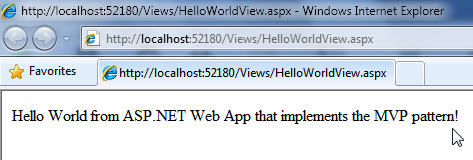
This is the output you get when you run the web app:

MVP Web App Castle Project - Hello World View

Summary
This post shows in a short and to the point way how you can implement the Model/View/Presenter pattern in your ASP.NET web applications.

Using the Model/View/Presenter pattern you’ll have more control over your code. It allows you to decouple responsibilities in your project in such way that you can delegate responsibilities to the right object in a clear fashion.

You keep the files that compose your solution in a folder structure that allows for fast maintenance and organization.

If you want to learn more about the subject discussed in this post, I advise you to read Wikipedia’s articles listed in the References section below.

Hope you make good use of it!

Notes
Although I do not present in this post the Model part of MVP, it’s straightforward to implement it. You’d have a new folder called Model in your project where you’d put the files related to your data model. You could employ LINQ to SQL to represent your model. Again you could use abstraction defining a base repository forcing repository classes to implement the base default methods.

You may have heard about the Model-View-Controller (MVC) pattern. MVP is in contrast with MVC. If you want to know the slight differences between these two patterns take a look at this excellent discussion on StackOverflow titled: What are MVP and MVC and what is the difference?

Visual Studio 2008 C# ASP.NET Web Application
You can get the Microsoft Visual Studio Project at:

http://sites.google.com/site/leniel/blog/MvpWebAppCastleProject.zip

To try out the code you can use the free Microsoft Visual Web Developer 2008 Express Edition that you can get at: http://www.microsoft.com/express/vwd/Default.aspx

References
Castle Project
http://www.castleproject.org/container/index.html

Windsor and MicroKernel documentation
http://www.castleproject.org/container/documentation/index.html

Architectural pattern
http://en.wikipedia.org/wiki/Architectural_pattern

Model View Presenter (MVP) article on Wikipedia
http://en.wikipedia.org/wiki/Model_View_Presenter

Model View Controller (MVC) article on Wikipedia
http://en.wikipedia.org/wiki/Model_View_Controller

Inversion of Control (IoC) article on Wikipedia
http://en.wikipedia.org/wiki/Inversion_of_control

Abstract Type article on Wikipedia
http://en.wikipedia.org/wiki/Abstract_type

Generic Programming article on Wikipedia
http://en.wikipedia.org/wiki/Generic_programming

Method overriding article on Wikipedia
http://en.wikipedia.org/wiki/Method_overriding

Interface article on Wikipedia
http://en.wikipedia.org/wiki/Interface_Computer_Science

Delegation pattern article on Wikipedia
http://en.wikipedia.org/wiki/Delegation_pattern

XHQ from IndX to Chemtech - A Siemens Company

During the past 7 business days I took part in a training about SIMATIC IT XHQ 4.0 software.
I participated in the Basic (21-22 Jan) and Advanced (25-29 Jan) training.

This training was given by the engineer Fabio Terasaka who’s a team lead at Chemtech having over 3 years of experience using and deploying XHQ in Brazil and internationally.

I decided to write this post so that people can get an overview of XHQ from a consultant/developer perspective.

I’m also excited about the endless possibilities XHQ has to offer when it comes to optimizing and applying intelligence to an enterprise.

What is XHQ?
For those who don’t know or who have never heard of XHQ, here goes a succinct description of it extracted from its official site:

SIMATIC IT XHQ Operations Intelligence product line aggregates, relates and presents operational and business data in real-time to improve enterprise performance. Through SIMATIC IT XHQ, you have a single coherent view of information, enabling a variety of solutions in real-time performance management and decision support. [1]

XQH extracts data from a variety of systems - as the production (PIMS), laboratory (LIMS) and plant-floor systems. XHQ unifies all the operational and management data in a single view, in real time, allowing you to take a snapshot, minute to minute or second to second, of all the enterprise.

XHQ can be integrated in the intranet or a website for operations management, integrating production data such as the use of raw material and equipment, stocks, as well as data related to the product (temperature, pressure, electrical current), quality and maintenance.

XHQ implements the concepts of Operational Dashboard and Management [2] by Key Performance Indicators (KPIs) [3].

XHQ is used in energy, petrochemical, and manufacturing industries to aggregate, draw relationships, and then graphically depict business and operational data.

XHQ Timeline
XHQ was created in 1996 by an American company called IndX Software Corp based on Aliso Viejo, California, USA.

In December 2003 Siemens expands its IT portfolio acquiring IndX [4].

In December 2009 Chemtech - A Siemens Company absorbs the company responsible for XHQ around the world [5].

XHQ Architecture
XHQ has a modular architecture as can be seen in the following picture:

XHQ Architecture Overview

Back-end Operational Systems
Comprised of databases and its respective connectors that give access to business real-time data: times series data (PHD, PI, OPC), real-time point data (Tags), relational databases (Oracle, MS-SQL), enterprise applications (SAP), etc.

Middle Tier
Comprised of XHQ set of servers. Each XHQ server plays a role in the system:

XHQ Enterprise Server manages the end-users views of data that are created by XHQ developers.

XHQ Solution Server has the Real-time Data Cache and the Relational Data Cache that removes the burden associated with backend data retrieval.

XHQ Alert Notification Server (XANS) is a subsystem of XHQ responsible for alerting end-users about any inconsistence existent in the system.

3rd Party Web Servers as IIS and Tomcat give end-users access to data processed by XHQ.

User Interface
Users can access XHQ processed data (Views) using PDAs, web browsers, etc.

Users also have access to View Statistics that is a kind of Google Analytics. It shows default reports about peak and average user count, user and view hits by month, user and view hits by week, view usage by user per day, view usage per day, etc. You can create your own analytics reports using custom SQL.

Starting with XHQ 4.0 there’s a separate application called Visual Composer that enables developers to create dynamic, high customizable data views. Visual Composer can use XHQ data collections as its data source.
Visual Composer focus in graphics/charts and tables/grids to show business strategic content.

XHQ behind the Curtains
XHQ does its job using a subscription model based on the client-server architecture. Clients are automatically notified of changes that occur on the monitored variables. For example, if a user uses a view that has 2 plant variables and their pool period (configured in the connector or on the variable itself) is set with 2 seconds, the user screen will automatically refresh (using Ajax) to show the new variable values at each 2 seconds. This is the so called real-time process management.

XHQ core is implemented in Java and uses a Java Applet that is loaded in the browser to present the data to the user.

XHQ makes extensive use of JavaScript to inject customization points into the software.

Servers configuration are kept in .properties files making it easy to edit.

Data presented to the user comes from “Collections” that use high performance data caches that are XHQ own local databases. You can use live data from the backend but it’s not advisable because of the overhead implied. The performance gains can be better verified when lots of users are using the same view.

Skills demanded by XHQ
To get XHQ up and running you’ll need the following skills:

SQL query skills. SQL is used all the time to retrieve the right data from the back-ends.

XML and XSLT skills. Both necessary to configure data points (Tags) in the system and to export data.

Previous software development skills using the .NET Framework or Java are important to develop extension points to XHQ.

JavaScript skills. Used to define custom system variables and client configuration.

HTML and CSS skills. Used to customize the user UI.

Web server administration using IIS and Tomcat is a plus when it comes to deploying the solution in the customer.

Computer network skills. Used to detected any problem between clients and servers.

Solid debugging skills related to the above mentioned technologies. If something goes wrong, you’ll need to check a lot of log files (there is one for each agent in the system).

XHQ Implementation
XHQ consultants/engineers are the guys responsible for studying the necessities of the customer interested in optimizing the enterprise.

The following are 10 basic steps used when XHQ is implemented as the choice for business optimization:

01 - XHQ is installed on client premises;
02 - Groups of users and use cases are defined;
03 - Connectors are created to access data sources scattered all over the enterprise;
04 - A solution model is defined;
05 - A navigation model is defined; 
06 - Views of data for different audiences and activities are built;
07 - System components and collections of data are linked for data retrieval;
08 - The solution is updated, tested and optimized;
09 - Steps 1 through 7 are iterated;
10 - Security is applied in the solution model through the use of roles/user groups.

XHQ Value as a RtPM Tool
XHQ aggregates value to your business as a RtPM (Real-time Process Management) tool:

Using XHQ, operational costs may decrease an average of 8% each year, while the production of high value products may increase 10.5%. This is because XHQ helps the management board in the decision taking process. [6]

The following are 10 basic reasons why XHQ aggregates value to the business:

01 - Directors and staff can take their decisions based on the same information;
02 - Response times are dramatically reduced;
03 - Information availability is made true from one area to another (and vice-versa);
04 - Interfaces between one area and another, usually managed by different teams and systems, can be closely monitored;
05 - User-friendly and self-explained process schematics simplify plan management;
06 - Reduced load on mission-critical systems: read only users can use only XHQ;
07 - Leverage of other investments: PIMS systems utilization is increased, and become mission-critical as well;
08 - Intangible gain: re-think strategies for company needs in terms of what information is
considered critical for business decisions;
09 - Integration with enterprise applications as SAP R/3, logistics is greatly improved by
watching supply and distribution movements;
10 - Transport can come and go (monitored) graphically.

XHQ Customers
XHQ is used throughout the world.

The following are some of the customers already using XHQ to optimize their business:

CSN, ExxonMobil, Chevron, Dow Chemical, Saudi Aramco among others.

Interested in optimizing your business?
If you’re looking for business optimization/intelligence, you can get in contact with Chemtech for more information.

Chemtech - Complete Solutions for Business Optimization

References
[1] SIMATIC IT XHQ official site

[2] Business Performance Management

[3] Key Performance Indicator

[4] Siemens expands its IT portfolio in process industries (PDF file)

[5] Chemtech absorbs the company responsible for XHQ around the world

[6] Siemens of Brazil Press Information (in Portuguese)

[7] XHQ for Steel Mills Real Time Performance Management (PDF file)

[8] XHQ can gather information from the whole oil & gas production chain

[9] Chemtech enters into the IndX’s biggest XHQ project in Brazil