SVN, Hudson and MSBuild - Revision control repository
SVN, Hudson and MSBuild - Building code on post commit
This is the second installment in the series I’m writing about SVN, Hudson and MSBuild.
This time I’ll show you how to set up a job in Hudson to build and package an ASP.NET MVC 3 Hello World sample app (download it here). This job will point to the SVN repository set up in the 1st part of this series. I’ve committed the app’s source code to the trunk folder and it’s now versioned.
Question: Why should I use a Continuous Integration ( CI ) process?
Because it allows you to fine tune and extend your build process. You’ll be able to plug hooks in various stages of your build process. CI gives you more control over the process allowing an infinite set of possibilities as for example an automated build => test => package => deploy scenario.
In this post I’m going to show this simple workflow: build => package
So, to start off, the first thing you should do is to download Hudson at http://hudson-ci.org/. The latest production version is 2.1.0 as of the time of this post. Download the .war file (53.3 MB) to your C:/ drive to keep things at hand. When the download finishes, read this thorough installation guide: Install Hudson as a Windows service. This is how I’ve set up Hudson. There should be no errors if you follow the instructions.
Note
Open a command prompt at C:\ and type:
java -jar hudson-2.1.0.war
This will start Hudson and you should be able to install it as a service following this link.
Now I suppose you have Hudson working on your machine.
Head over to you Hudson instance that is located at this URL by default:
http://localhost:8080/
Let’s configure a new Job in Hudson:
 Figure 1 - Selecting New Job in Hudson dashboard
When you click the New Job link you go to a screen where you can give a name to the job and choose what kind of build you want the job to execute.
I named the job HelloWorldMvc3 and selected Build a free-style software project because it fits the purpose of this series.
* As you can see I already have a job called FitnessCenter configured.
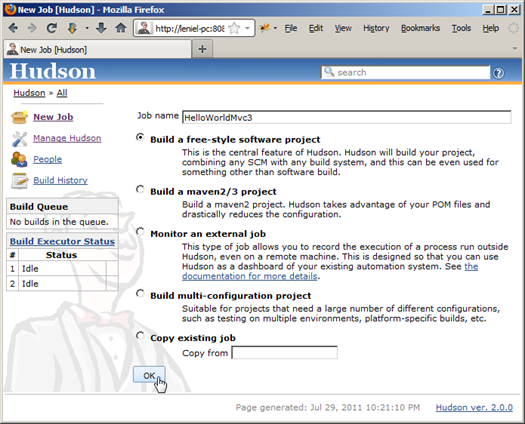 Figure 2 - Naming the New Job and selecting the build type
After clicking OK we go to a new page that allows us to enter detailed configuration settings. The following image shows the options I used (click the image to enlarge it):
 Figure 3 - Configuring the job and adding a Visual Studio project or solution build step
Note above in the Source Code Management section that I have chosen Subversion and passed the Repository URL:
file:///C:/svn/MyProject/trunk
The path above is related to the SVN repository I set up here.
The sample ASP.NET MVC 3 Hello World app is located in the /trunk folder.
Now we must add a build step to tell Hudson we want to build and package the app as part of the job execution. I have highlighted the option in blue in Figure 3 above. I selected Build a Visual Studio project or solution using MSBuild.
When you add that build step you must pass some info to Hudson as shown in the following picture:
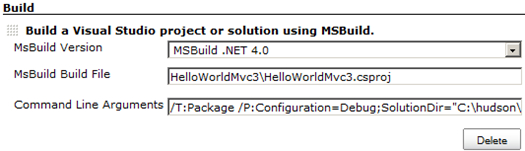
Figure 4 - Selecting MSBuild version, filling MSBuild Build File and specifying the command line arguments
MsBuild Build File = the path to the .proj or .sln file that MSBuild will use to build. This path is related to the trunk folder structure you have. In this case I have this folder structure:
C:\MyProject\trunk\HelloWorldMvc3\HelloWorldMvc3.csproj
Command Line Arguments = a whitespace separated list of command line arguments you can specify. These can be the same as if you were to run msbuild from the command line.
I used these command line arguments above to package the app:
/T:Package /P:Configuration=Release;
SolutionDir="C:\hudson\jobs\MyProject\workspace\;
PackageLocation="C:\MyProject\Package.zip"
 These command line arguments are power in our hands…
You can also select post-build actions as to send an e-mail notification. If configured, Hudson will send out an e-mail to the specified recipients when a certain important event occurs:
1 - Every failed build triggers a new e-mail.
2 - A successful build after a failed (or unstable) build triggers a new e-mail, indicating that a crisis is over.
3 - An unstable build after a successful build triggers a new e-mail, indicating that there's a regression.
4 - Unless configured, every unstable build triggers a new e-mail, indicating that regression is still there.
When you finish the configuration, make sure to click the Save button.
This is everything you need to configure a new job in Hudson.
With this we achieved our objective, that is, Hudson and SVN are now plugged.
To run the job and build the app I just have to click the Build Now link in Hudson panel (see left menu bar at the top in Figure 3) but the great thing about a Continuous Integration process it to have the build process happen automatically and this is definitely possible.
Summary
Hudson is a free CI server which makes it a viable option for the majority of developers and companies out there that don’t want to spend a lot of money with equivalent expensive software. Besides, as you saw in this post you can get it working with Subversion in a couple of minutes.
Hudson has a lot of additional goodies that you can and should explore. Go over each menu option to learn about its additional features.
Next in this series
In the next and final part of this series I’m going to show you what’s missing to get SVN to inform Hudson that it’s time to build the code just committed to the repository. In the meanwhile I’ll entertain you with the Console Output regarding the first execution of the job we created in this post. It took only 08.33 seconds to build and package the app in a beautiful .zip package that can be used to deploy the app in IIS (I'll do a blog post about this topic in the future):
Started by user anonymous
Checking out file:///C:/svn/MyProject/trunk
A         HelloWorldMvc3.sln
AU        HelloWorldMvc3.suo
A         HelloWorldMvc3
A         HelloWorldMvc3\HelloWorldMvc3.csproj
A         HelloWorldMvc3\Properties
A         HelloWorldMvc3\Properties\AssemblyInfo.cs
A         HelloWorldMvc3\Web.Release.config
A         HelloWorldMvc3\packages.config
A         HelloWorldMvc3\Global.asax
A         HelloWorldMvc3\Controllers
A         HelloWorldMvc3\Controllers\HomeController.cs
A         HelloWorldMvc3\Controllers\AccountController.cs
A         HelloWorldMvc3\Web.Debug.config
A         HelloWorldMvc3\App_Data
A         HelloWorldMvc3\Scripts
A         HelloWorldMvc3\Scripts\modernizr-1.7.js
A         HelloWorldMvc3\Scripts\jquery.validate.js
A         HelloWorldMvc3\Scripts\jquery.unobtrusive-ajax.js
A         HelloWorldMvc3\Scripts\MicrosoftMvcValidation.js
A         HelloWorldMvc3\Scripts\jquery.validate-vsdoc.js
A         HelloWorldMvc3\Scripts\MicrosoftMvcAjax.js
A         HelloWorldMvc3\Scripts\jquery.validate.unobtrusive.min.js
A         HelloWorldMvc3\Scripts\MicrosoftMvcValidation.debug.js
A         HelloWorldMvc3\Scripts\jquery-1.5.1-vsdoc.js
A         HelloWorldMvc3\Scripts\MicrosoftMvcAjax.debug.js
A         HelloWorldMvc3\Scripts\jquery-ui-1.8.11.min.js
A         HelloWorldMvc3\Scripts\jquery-1.5.1.min.js
A         HelloWorldMvc3\Scripts\MicrosoftAjax.js
A         HelloWorldMvc3\Scripts\jquery-ui-1.8.11.js
A         HelloWorldMvc3\Scripts\jquery-1.5.1.js
A         HelloWorldMvc3\Scripts\MicrosoftAjax.debug.js
A         HelloWorldMvc3\Scripts\modernizr-1.7.min.js
A         HelloWorldMvc3\Scripts\jquery.validate.min.js
A         HelloWorldMvc3\Scripts\jquery.unobtrusive-ajax.min.js
A         HelloWorldMvc3\Scripts\jquery.validate.unobtrusive.js
A         HelloWorldMvc3\Content
A         HelloWorldMvc3\Content\themes
A         HelloWorldMvc3\Content\themes\base
A         HelloWorldMvc3\Content\themes\base\jquery.ui.base.css
A         HelloWorldMvc3\Content\themes\base\jquery.ui.slider.css
A         HelloWorldMvc3\Content\themes\base\jquery.ui.button.css
A         HelloWorldMvc3\Content\themes\base\jquery.ui.progressbar.css
A         HelloWorldMvc3\Content\themes\base\jquery.ui.accordion.css
A         HelloWorldMvc3\Content\themes\base\jquery.ui.theme.css
A         HelloWorldMvc3\Content\themes\base\jquery.ui.selectable.css
A         HelloWorldMvc3\Content\themes\base\jquery.ui.resizable.css
A         HelloWorldMvc3\Content\themes\base\jquery.ui.autocomplete.css
A         HelloWorldMvc3\Content\themes\base\jquery.ui.dialog.css
A         HelloWorldMvc3\Content\themes\base\images
AU        HelloWorldMvc3\Content\themes\base\images\ui-bg_glass_95_fef1ec_1x400.png
AU        HelloWorldMvc3\Content\themes\base\images\ui-icons_2e83ff_256x240.png
AU        HelloWorldMvc3\Content\themes\base\images\ui-bg_flat_75_ffffff_40x100.png
AU        HelloWorldMvc3\Content\themes\base\images\ui-bg_glass_55_fbf9ee_1x400.png
AU        HelloWorldMvc3\Content\themes\base\images\ui-icons_222222_256x240.png
AU        HelloWorldMvc3\Content\themes\base\images\ui-icons_888888_256x240.png
AU        HelloWorldMvc3\Content\themes\base\images\ui-bg_glass_65_ffffff_1x400.png
AU        HelloWorldMvc3\Content\themes\base\images\ui-icons_454545_256x240.png
AU        HelloWorldMvc3\Content\themes\base\images\ui-icons_cd0a0a_256x240.png
AU        HelloWorldMvc3\Content\themes\base\images\ui-bg_glass_75_e6e6e6_1x400.png
AU        HelloWorldMvc3\Content\themes\base\images\ui-bg_flat_0_aaaaaa_40x100.png
AU        HelloWorldMvc3\Content\themes\base\images\ui-bg_highlight-soft_75_cccccc_1x100.png
AU        HelloWorldMvc3\Content\themes\base\images\ui-bg_glass_75_dadada_1x400.png
A         HelloWorldMvc3\Content\themes\base\jquery.ui.datepicker.css
A         HelloWorldMvc3\Content\themes\base\jquery.ui.all.css
A         HelloWorldMvc3\Content\themes\base\jquery.ui.tabs.css
A         HelloWorldMvc3\Content\themes\base\jquery.ui.core.css
A         HelloWorldMvc3\Content\Site.css
A         HelloWorldMvc3\Global.asax.cs
A         HelloWorldMvc3\Models
A         HelloWorldMvc3\Models\AccountModels.cs
A         HelloWorldMvc3\Web.config
A         HelloWorldMvc3\Views
A         HelloWorldMvc3\Views\Shared
A         HelloWorldMvc3\Views\Shared\_Layout.cshtml
A         HelloWorldMvc3\Views\Shared\Error.cshtml
A         HelloWorldMvc3\Views\Shared\_LogOnPartial.cshtml
A         HelloWorldMvc3\Views\_ViewStart.cshtml
A         HelloWorldMvc3\Views\Web.config
A         HelloWorldMvc3\Views\Account
A         HelloWorldMvc3\Views\Account\ChangePasswordSuccess.cshtml
A         HelloWorldMvc3\Views\Account\LogOn.cshtml
A         HelloWorldMvc3\Views\Account\Register.cshtml
A         HelloWorldMvc3\Views\Account\ChangePassword.cshtml
A         HelloWorldMvc3\Views\Home
A         HelloWorldMvc3\Views\Home\Index.cshtml
A         HelloWorldMvc3\Views\Home\About.cshtml
AU        HelloWorldMvc3.sln.docstates.suo
A         packages
A         packages\jQuery.UI.Combined.1.8.11
A         packages\jQuery.UI.Combined.1.8.11\Content
A         packages\jQuery.UI.Combined.1.8.11\Content\Scripts
A         packages\jQuery.UI.Combined.1.8.11\Content\Scripts\jquery-ui-1.8.11.min.js
A         packages\jQuery.UI.Combined.1.8.11\Content\Scripts\jquery-ui-1.8.11.js
A         packages\jQuery.UI.Combined.1.8.11\Content\Content
A         packages\jQuery.UI.Combined.1.8.11\Content\Content\themes
A         packages\jQuery.UI.Combined.1.8.11\Content\Content\themes\base
A         packages\jQuery.UI.Combined.1.8.11\Content\Content\themes\base\jquery.ui.base.css
A         packages\jQuery.UI.Combined.1.8.11\Content\Content\themes\base\jquery.ui.slider.css
A         packages\jQuery.UI.Combined.1.8.11\Content\Content\themes\base\jquery.ui.button.css
A         packages\jQuery.UI.Combined.1.8.11\Content\Content\themes\base\jquery.ui.progressbar.css
A         packages\jQuery.UI.Combined.1.8.11\Content\Content\themes\base\jquery.ui.accordion.css
A         packages\jQuery.UI.Combined.1.8.11\Content\Content\themes\base\jquery.ui.theme.css
A         packages\jQuery.UI.Combined.1.8.11\Content\Content\themes\base\jquery.ui.selectable.css
A         packages\jQuery.UI.Combined.1.8.11\Content\Content\themes\base\jquery.ui.resizable.css
A         packages\jQuery.UI.Combined.1.8.11\Content\Content\themes\base\jquery.ui.autocomplete.css
A         packages\jQuery.UI.Combined.1.8.11\Content\Content\themes\base\jquery.ui.dialog.css
A         packages\jQuery.UI.Combined.1.8.11\Content\Content\themes\base\images
AU        packages\jQuery.UI.Combined.1.8.11\Content\Content\themes\base\images\ui-bg_glass_95_fef1ec_1x400.png
AU        packages\jQuery.UI.Combined.1.8.11\Content\Content\themes\base\images\ui-icons_2e83ff_256x240.png
AU        packages\jQuery.UI.Combined.1.8.11\Content\Content\themes\base\images\ui-bg_flat_75_ffffff_40x100.png
AU        packages\jQuery.UI.Combined.1.8.11\Content\Content\themes\base\images\ui-bg_glass_55_fbf9ee_1x400.png
AU        packages\jQuery.UI.Combined.1.8.11\Content\Content\themes\base\images\ui-icons_222222_256x240.png
AU        packages\jQuery.UI.Combined.1.8.11\Content\Content\themes\base\images\ui-icons_888888_256x240.png
AU        packages\jQuery.UI.Combined.1.8.11\Content\Content\themes\base\images\ui-bg_glass_65_ffffff_1x400.png
AU        packages\jQuery.UI.Combined.1.8.11\Content\Content\themes\base\images\ui-icons_454545_256x240.png
AU        packages\jQuery.UI.Combined.1.8.11\Content\Content\themes\base\images\ui-icons_cd0a0a_256x240.png
AU        packages\jQuery.UI.Combined.1.8.11\Content\Content\themes\base\images\ui-bg_glass_75_e6e6e6_1x400.png
AU        packages\jQuery.UI.Combined.1.8.11\Content\Content\themes\base\images\ui-bg_flat_0_aaaaaa_40x100.png
AU        packages\jQuery.UI.Combined.1.8.11\Content\Content\themes\base\images\ui-bg_highlight-soft_75_cccccc_1x100.png
AU        packages\jQuery.UI.Combined.1.8.11\Content\Content\themes\base\images\ui-bg_glass_75_dadada_1x400.png
A         packages\jQuery.UI.Combined.1.8.11\Content\Content\themes\base\jquery.ui.datepicker.css
A         packages\jQuery.UI.Combined.1.8.11\Content\Content\themes\base\jquery.ui.all.css
A         packages\jQuery.UI.Combined.1.8.11\Content\Content\themes\base\jquery.ui.tabs.css
A         packages\jQuery.UI.Combined.1.8.11\Content\Content\themes\base\jquery.ui.core.css
AU        packages\jQuery.UI.Combined.1.8.11\jQuery.UI.Combined.1.8.11.nupkg
A         packages\jQuery.Validation.1.8.0
A         packages\jQuery.Validation.1.8.0\Content
A         packages\jQuery.Validation.1.8.0\Content\Scripts
A         packages\jQuery.Validation.1.8.0\Content\Scripts\jquery.validate.js
A         packages\jQuery.Validation.1.8.0\Content\Scripts\jquery.validate-vsdoc.js
A         packages\jQuery.Validation.1.8.0\Content\Scripts\jquery.validate.min.js
AU        packages\jQuery.Validation.1.8.0\jQuery.Validation.1.8.0.nupkg
A         packages\jQuery.vsdoc.1.5.1
A         packages\jQuery.vsdoc.1.5.1\Content
A         packages\jQuery.vsdoc.1.5.1\Content\Scripts
A         packages\jQuery.vsdoc.1.5.1\Content\Scripts\jquery-1.5.1-vsdoc.js
AU        packages\jQuery.vsdoc.1.5.1\jQuery.vsdoc.1.5.1.nupkg
A         packages\repositories.config
A         packages\EntityFramework.4.1.10331.0
AU        packages\EntityFramework.4.1.10331.0\EntityFramework.4.1.10331.0.nupkg
A         packages\EntityFramework.4.1.10331.0\lib
AU        packages\EntityFramework.4.1.10331.0\lib\EntityFramework.dll
A         packages\EntityFramework.4.1.10331.0\lib\EntityFramework.xml
A         packages\jQuery.1.5.1
AU        packages\jQuery.1.5.1\jQuery.1.5.1.nupkg
A         packages\jQuery.1.5.1\Content
A         packages\jQuery.1.5.1\Content\Scripts
A         packages\jQuery.1.5.1\Content\Scripts\jquery-1.5.1.min.js
A         packages\jQuery.1.5.1\Content\Scripts\jquery-1.5.1.js
A         packages\Modernizr.1.7
AU        packages\Modernizr.1.7\Modernizr.1.7.nupkg
A         packages\Modernizr.1.7\Content
A         packages\Modernizr.1.7\Content\Scripts
A         packages\Modernizr.1.7\Content\Scripts\modernizr-1.7.min.js
A         packages\Modernizr.1.7\Content\Scripts\modernizr-1.7.js
At revision 2
Path To MSBuild.exe: C:\Windows\Microsoft.NET\Framework\v4.0.30319\MSBuild.exe
Executing command: cmd.exe /C C:\Windows\Microsoft.NET\Framework\v4.0.30319\MSBuild.exe /T:Package /P:Configuration=Debug;SolutionDir=C:\hudson\jobs\MyProject\workspace\;PackageLocation=C:\MyProject\Package.zip HelloWorldMvc3\HelloWorldMvc3.csproj && exit %%ERRORLEVEL%%
[workspace] $ cmd.exe /C C:\Windows\Microsoft.NET\Framework\v4.0.30319\MSBuild.exe /T:Package /P:Configuration=Debug;SolutionDir=C:\hudson\jobs\MyProject\workspace\;PackageLocation=C:\MyProject\Package.zip HelloWorldMvc3\HelloWorldMvc3.csproj && exit %%ERRORLEVEL%%
Microsoft (R) Build Engine Version 4.0.30319.1
[Microsoft .NET Framework, Version 4.0.30319.454]
Copyright (C) Microsoft Corporation 2007. All rights reserved.

Build started 7/30/2011 12:16:23 AM.
Project "C:\hudson\jobs\HelloWorldMvc3\workspace\HelloWorldMvc3\HelloWorldMvc3.csproj" on node 1 (Package target(s)).
ValidateGlobalPackageSetting:
  $(PackageAsSingleFile) is True
  $(PackageFileName) is C:\MyProject\Package.zip. Validating...
PrepareForBuild:
  Creating directory "bin\".
  Creating directory "obj\Debug\".
GenerateTargetFrameworkMonikerAttribute:
Skipping target "GenerateTargetFrameworkMonikerAttribute" because all output files are up-to-date with respect to the input files.
CoreCompile:
  c:\Windows\Microsoft.NET\Framework\v4.0.30319\Csc.exe /noconfig /nowarn:1701,1702 /nostdlib+ /errorreport:prompt /warn:4 /define:DEBUG;TRACE /reference:C:\hudson\jobs\HelloWorldMvc3\workspace\packages\EntityFramework.4.1.10331.0\lib\EntityFramework.dll /reference:"C:\Program Files\Reference Assemblies\Microsoft\Framework\.NETFramework\v4.0\Microsoft.CSharp.dll" /reference:"C:\Program Files\Reference Assemblies\Microsoft\Framework\.NETFramework\v4.0\mscorlib.dll" /reference:"C:\Program Files\Reference Assemblies\Microsoft\Framework\.NETFramework\v4.0\System.ComponentModel.DataAnnotations.dll" /reference:"C:\Program Files\Reference Assemblies\Microsoft\Framework\.NETFramework\v4.0\System.Configuration.dll" /reference:"C:\Program Files\Reference Assemblies\Microsoft\Framework\.NETFramework\v4.0\System.Core.dll" /reference:"C:\Program Files\Reference Assemblies\Microsoft\Framework\.NETFramework\v4.0\System.Data.DataSetExtensions.dll" /reference:"C:\Program Files\Reference Assemblies\Microsoft\Framework\.NETFramework\v4.0\System.Data.dll" /reference:"C:\Program Files\Reference Assemblies\Microsoft\Framework\.NETFramework\v4.0\System.Data.Entity.dll" /reference:"C:\Program Files\Reference Assemblies\Microsoft\Framework\.NETFramework\v4.0\System.dll" /reference:"C:\Program Files\Reference Assemblies\Microsoft\Framework\.NETFramework\v4.0\System.Drawing.dll" /reference:"C:\Program Files\Reference Assemblies\Microsoft\Framework\.NETFramework\v4.0\System.EnterpriseServices.dll" /reference:"C:\Program Files\Reference Assemblies\Microsoft\Framework\.NETFramework\v4.0\System.Web.Abstractions.dll" /reference:"C:\Program Files\Reference Assemblies\Microsoft\Framework\.NETFramework\v4.0\System.Web.ApplicationServices.dll" /reference:"C:\Program Files\Reference Assemblies\Microsoft\Framework\.NETFramework\v4.0\System.Web.dll" /reference:"C:\Program Files\Reference Assemblies\Microsoft\Framework\.NETFramework\v4.0\System.Web.DynamicData.dll" /reference:"C:\Program Files\Reference Assemblies\Microsoft\Framework\.NETFramework\v4.0\System.Web.Entity.dll" /reference:"C:\Program Files\Reference Assemblies\Microsoft\Framework\.NETFramework\v4.0\System.Web.Extensions.dll" /reference:"c:\Program Files\Microsoft ASP.NET\ASP.NET Web Pages\v1.0\Assemblies\System.Web.Helpers.dll" /reference:"c:\Program Files\Microsoft ASP.NET\ASP.NET MVC 3\Assemblies\System.Web.Mvc.dll" /reference:"C:\Program Files\Reference Assemblies\Microsoft\Framework\.NETFramework\v4.0\System.Web.Routing.dll" /reference:"C:\Program Files\Reference Assemblies\Microsoft\Framework\.NETFramework\v4.0\System.Web.Services.dll" /reference:"c:\Program Files\Microsoft ASP.NET\ASP.NET Web Pages\v1.0\Assemblies\System.Web.WebPages.dll" /reference:"C:\Program Files\Reference Assemblies\Microsoft\Framework\.NETFramework\v4.0\System.Xml.dll" /reference:"C:\Program Files\Reference Assemblies\Microsoft\Framework\.NETFramework\v4.0\System.Xml.Linq.dll" /debug+ /debug:full /optimize- /out:obj\Debug\HelloWorldMvc3.dll /target:library Controllers\AccountController.cs Controllers\HomeController.cs Global.asax.cs Models\AccountModels.cs Properties\AssemblyInfo.cs "C:\Windows\TEMP\.NETFramework,Version=v4.0.AssemblyAttributes.cs"
_CopyFilesMarkedCopyLocal:
  Copying file from "C:\hudson\jobs\HelloWorldMvc3\workspace\packages\EntityFramework.4.1.10331.0\lib\EntityFramework.dll" to "bin\EntityFramework.dll".
  Copying file from "C:\hudson\jobs\HelloWorldMvc3\workspace\packages\EntityFramework.4.1.10331.0\lib\EntityFramework.xml" to "bin\EntityFramework.xml".
CopyFilesToOutputDirectory:
  Copying file from "obj\Debug\HelloWorldMvc3.dll" to "bin\HelloWorldMvc3.dll".
  HelloWorldMvc3 -> C:\hudson\jobs\HelloWorldMvc3\workspace\HelloWorldMvc3\bin\HelloWorldMvc3.dll
  Copying file from "obj\Debug\HelloWorldMvc3.pdb" to "bin\HelloWorldMvc3.pdb".
CollectFilesFromIntermediateAssembly:
  Gather all files from Project items @(IntermediateAssembly). Adding:
  bin\HelloWorldMvc3.dll to bin\HelloWorldMvc3.dll
  bin\HelloWorldMvc3.pdb to bin\HelloWorldMvc3.pdb
CollectFilesFromContent:
  Gather all files from Project items @(Content). Adding:
  Content\themes\base\images\ui-bg_flat_0_aaaaaa_40x100.png;Content\themes\base\images\ui-bg_flat_75_ffffff_40x100.png;Content\themes\base\images\ui-bg_glass_55_fbf9ee_1x400.png;Content\themes\base\images\ui-bg_glass_65_ffffff_1x400.png;Content\themes\base\images\ui-bg_glass_75_dadada_1x400.png;Content\themes\base\images\ui-bg_glass_75_e6e6e6_1x400.png;Content\themes\base\images\ui-bg_glass_95_fef1ec_1x400.png;Content\themes\base\images\ui-bg_highlight-soft_75_cccccc_1x100.png;Content\themes\base\images\ui-icons_222222_256x240.png;Content\themes\base\images\ui-icons_2e83ff_256x240.png;Content\themes\base\images\ui-icons_454545_256x240.png;Content\themes\base\images\ui-icons_888888_256x240.png;Content\themes\base\images\ui-icons_cd0a0a_256x240.png;Content\themes\base\jquery.ui.accordion.css;Content\themes\base\jquery.ui.all.css;Content\themes\base\jquery.ui.autocomplete.css;Content\themes\base\jquery.ui.base.css;Content\themes\base\jquery.ui.button.css;Content\themes\base\jquery.ui.core.css;Content\themes\base\jquery.ui.datepicker.css;Content\themes\base\jquery.ui.dialog.css;Content\themes\base\jquery.ui.progressbar.css;Content\themes\base\jquery.ui.resizable.css;Content\themes\base\jquery.ui.selectable.css;Content\themes\base\jquery.ui.slider.css;Content\themes\base\jquery.ui.tabs.css;Content\themes\base\jquery.ui.theme.css;Global.asax;Scripts\jquery-1.5.1-vsdoc.js;Scripts\jquery-1.5.1.js;Scripts\jquery-1.5.1.min.js;Scripts\jquery-ui-1.8.11.js;Scripts\jquery-ui-1.8.11.min.js;Scripts\jquery.validate-vsdoc.js;Scripts\jquery.validate.js;Scripts\jquery.validate.min.js;Scripts\modernizr-1.7.js;Scripts\modernizr-1.7.min.js;Web.config;Web.Debug.config;Web.Release.config;Content\Site.css;Scripts\jquery.unobtrusive-ajax.js;Scripts\jquery.unobtrusive-ajax.min.js;Scripts\jquery.validate.unobtrusive.js;Scripts\jquery.validate.unobtrusive.min.js;Scripts\MicrosoftAjax.js;Scripts\MicrosoftAjax.debug.js;Scripts\MicrosoftMvcAjax.js;Scripts\MicrosoftMvcAjax.debug.js;Scripts\MicrosoftMvcValidation.js;Scripts\MicrosoftMvcValidation.debug.js;Views\_ViewStart.cshtml;Views\Account\ChangePassword.cshtml;Views\Account\ChangePasswordSuccess.cshtml;Views\Account\LogOn.cshtml;Views\Account\Register.cshtml;Views\Home\About.cshtml;Views\Home\Index.cshtml;Views\Shared\Error.cshtml;Views\Shared\_LogOnPartial.cshtml;Views\Shared\_Layout.cshtml;Views\Web.config;packages.config
CollectFilesFromIntermediateSatelliteAssembliesWithTargetPath:
  Gather all files from Project output (IntermediateSatelliteAssembliesWithTargetPath). Adding:
CollectFilesFromReference:
  Gather all files from Project items @(ReferenceCopyLocalPaths,ReferenceComWrappersToCopyLocal,ResolvedIsolatedComModules,_DeploymentLooseManifestFile,NativeReferenceFile).
CollectFilesFromAllExtraReferenceFiles:
  Gather all files from Project items @(AllExtraReferenceFiles). Adding:
CollectFilesFrom_binDeployableAssemblies:
  Gather all files from Project items @(_binDeployableAssemblies). Adding:
PipelineCollectFilesPhase:
  Publish Pipeline Collect Files Phase
CollectWebConfigsToTransform:
  Found The following for Config tranformation:
  Web.config, Views\Web.config
  Creating directory "C:\hudson\jobs\HelloWorldMvc3\workspace\HelloWorldMvc3\obj\Debug\TransformWebConfig\transformed\".
  Creating directory "C:\hudson\jobs\HelloWorldMvc3\workspace\HelloWorldMvc3\obj\Debug\TransformWebConfig\transformed\Views\".
PreTransformWebConfig:
  Copying Web.config to obj\Debug\TransformWebConfig\original\Web.config.
TransformWebConfigCore:
  Transforming Source File: C:\hudson\jobs\HelloWorldMvc3\workspace\HelloWorldMvc3\Web.config
    Applying Transform File: C:\hudson\jobs\HelloWorldMvc3\workspace\HelloWorldMvc3\Web.Debug.config
    Output File: obj\Debug\TransformWebConfig\transformed\Web.config
  Transformation succeeded
PostTransformWebConfig:
  Transformed Web.config using Web.Debug.config into obj\Debug\TransformWebConfig\transformed\Web.config.
PipelineTransformPhase:
  Publish Pipeline Transform Phase
PreAutoParameterizationWebConfigConnectionStrings:
  Creating directory "C:\hudson\jobs\HelloWorldMvc3\workspace\HelloWorldMvc3\obj\Debug\CSAutoParameterize\transformed\Views\".
  Copying Views\Web.config to obj\Debug\CSAutoParameterize\original\Views\Web.config.
  Copying obj\Debug\TransformWebConfig\transformed\Web.config to obj\Debug\CSAutoParameterize\original\Web.config.
AutoParameterizationWebConfigConnectionStringsCore:
  Transforming Source File: C:\hudson\jobs\HelloWorldMvc3\workspace\HelloWorldMvc3\Views\Web.config
    Applying Transform File: <?xml version="1.0"?>
          <configuration xmlns:xdt="http://schemas.microsoft.com/XML-Document-Transform">
            <connectionStrings>
              <add
                connectionString="{% token='$(ReplacableToken_#(parameter)_#(tokennumber))' xpathlocator='name' parameter='$(name)-Web.config Connection String' description='$(name) Connection String used in web.config by the application to access the database.' defaultValue='$(connectionString)' tags='SqlConnectionString' %}"
                xdt:Transform="SetTokenizedAttributes(connectionString)" xdt:SupressWarnings="True" />
            </connectionStrings>
          </configuration>
    No element in the source document matches '/configuration/connectionStrings'
    Not executing SetTokenizedAttributes (transform line 6, 15)
    Output File: obj\Debug\CSAutoParameterize\transformed\Views\Web.config
  Transformation succeeded
  Transforming Source File: C:\hudson\jobs\HelloWorldMvc3\workspace\HelloWorldMvc3\obj\Debug\TransformWebConfig\transformed\Web.config
    Applying Transform File: <?xml version="1.0"?>
          <configuration xmlns:xdt="http://schemas.microsoft.com/XML-Document-Transform">
            <connectionStrings>
              <add
                connectionString="{% token='$(ReplacableToken_#(parameter)_#(tokennumber))' xpathlocator='name' parameter='$(name)-Web.config Connection String' description='$(name) Connection String used in web.config by the application to access the database.' defaultValue='$(connectionString)' tags='SqlConnectionString' %}"
                xdt:Transform="SetTokenizedAttributes(connectionString)" xdt:SupressWarnings="True" />
            </connectionStrings>
          </configuration>
    Output File: obj\Debug\CSAutoParameterize\transformed\Web.config
  Transformation succeeded
PostAutoParameterizationWebConfigConnectionStrings:
  Auto ConnectionString Transformed Views\Web.config into obj\Debug\CSAutoParameterize\transformed\Views\Web.config.
  Auto ConnectionString Transformed obj\Debug\TransformWebConfig\transformed\Web.config into obj\Debug\CSAutoParameterize\transformed\Web.config.
CopyAllFilesToSingleFolderForPackage:
  Creating directory "obj\Debug\Package\PackageTmp".
  Copying all files to temporary location below for package/publish:
  obj\Debug\Package\PackageTmp.
  Copying bin\HelloWorldMvc3.dll to obj\Debug\Package\PackageTmp\bin\HelloWorldMvc3.dll.
  Copying bin\HelloWorldMvc3.pdb to obj\Debug\Package\PackageTmp\bin\HelloWorldMvc3.pdb.
  Copying Content\themes\base\images\ui-bg_flat_0_aaaaaa_40x100.png to obj\Debug\Package\PackageTmp\Content\themes\base\images\ui-bg_flat_0_aaaaaa_40x100.png.
  Copying Content\themes\base\images\ui-bg_flat_75_ffffff_40x100.png to obj\Debug\Package\PackageTmp\Content\themes\base\images\ui-bg_flat_75_ffffff_40x100.png.
  Copying Content\themes\base\images\ui-bg_glass_55_fbf9ee_1x400.png to obj\Debug\Package\PackageTmp\Content\themes\base\images\ui-bg_glass_55_fbf9ee_1x400.png.
  Copying Content\themes\base\images\ui-bg_glass_65_ffffff_1x400.png to obj\Debug\Package\PackageTmp\Content\themes\base\images\ui-bg_glass_65_ffffff_1x400.png.
  Copying Content\themes\base\images\ui-bg_glass_75_dadada_1x400.png to obj\Debug\Package\PackageTmp\Content\themes\base\images\ui-bg_glass_75_dadada_1x400.png.
  Copying Content\themes\base\images\ui-bg_glass_75_e6e6e6_1x400.png to obj\Debug\Package\PackageTmp\Content\themes\base\images\ui-bg_glass_75_e6e6e6_1x400.png.
  Copying Content\themes\base\images\ui-bg_glass_95_fef1ec_1x400.png to obj\Debug\Package\PackageTmp\Content\themes\base\images\ui-bg_glass_95_fef1ec_1x400.png.
  Copying Content\themes\base\images\ui-bg_highlight-soft_75_cccccc_1x100.png to obj\Debug\Package\PackageTmp\Content\themes\base\images\ui-bg_highlight-soft_75_cccccc_1x100.png.
  Copying Content\themes\base\images\ui-icons_222222_256x240.png to obj\Debug\Package\PackageTmp\Content\themes\base\images\ui-icons_222222_256x240.png.
  Copying Content\themes\base\images\ui-icons_2e83ff_256x240.png to obj\Debug\Package\PackageTmp\Content\themes\base\images\ui-icons_2e83ff_256x240.png.
  Copying Content\themes\base\images\ui-icons_454545_256x240.png to obj\Debug\Package\PackageTmp\Content\themes\base\images\ui-icons_454545_256x240.png.
  Copying Content\themes\base\images\ui-icons_888888_256x240.png to obj\Debug\Package\PackageTmp\Content\themes\base\images\ui-icons_888888_256x240.png.
  Copying Content\themes\base\images\ui-icons_cd0a0a_256x240.png to obj\Debug\Package\PackageTmp\Content\themes\base\images\ui-icons_cd0a0a_256x240.png.
  Copying Content\themes\base\jquery.ui.accordion.css to obj\Debug\Package\PackageTmp\Content\themes\base\jquery.ui.accordion.css.
  Copying Content\themes\base\jquery.ui.all.css to obj\Debug\Package\PackageTmp\Content\themes\base\jquery.ui.all.css.
  Copying Content\themes\base\jquery.ui.autocomplete.css to obj\Debug\Package\PackageTmp\Content\themes\base\jquery.ui.autocomplete.css.
  Copying Content\themes\base\jquery.ui.base.css to obj\Debug\Package\PackageTmp\Content\themes\base\jquery.ui.base.css.
  Copying Content\themes\base\jquery.ui.button.css to obj\Debug\Package\PackageTmp\Content\themes\base\jquery.ui.button.css.
  Copying Content\themes\base\jquery.ui.core.css to obj\Debug\Package\PackageTmp\Content\themes\base\jquery.ui.core.css.
  Copying Content\themes\base\jquery.ui.datepicker.css to obj\Debug\Package\PackageTmp\Content\themes\base\jquery.ui.datepicker.css.
  Copying Content\themes\base\jquery.ui.dialog.css to obj\Debug\Package\PackageTmp\Content\themes\base\jquery.ui.dialog.css.
  Copying Content\themes\base\jquery.ui.progressbar.css to obj\Debug\Package\PackageTmp\Content\themes\base\jquery.ui.progressbar.css.
  Copying Content\themes\base\jquery.ui.resizable.css to obj\Debug\Package\PackageTmp\Content\themes\base\jquery.ui.resizable.css.
  Copying Content\themes\base\jquery.ui.selectable.css to obj\Debug\Package\PackageTmp\Content\themes\base\jquery.ui.selectable.css.
  Copying Content\themes\base\jquery.ui.slider.css to obj\Debug\Package\PackageTmp\Content\themes\base\jquery.ui.slider.css.
  Copying Content\themes\base\jquery.ui.tabs.css to obj\Debug\Package\PackageTmp\Content\themes\base\jquery.ui.tabs.css.
  Copying Content\themes\base\jquery.ui.theme.css to obj\Debug\Package\PackageTmp\Content\themes\base\jquery.ui.theme.css.
  Copying Global.asax to obj\Debug\Package\PackageTmp\Global.asax.
  Copying Scripts\jquery-1.5.1-vsdoc.js to obj\Debug\Package\PackageTmp\Scripts\jquery-1.5.1-vsdoc.js.
  Copying Scripts\jquery-1.5.1.js to obj\Debug\Package\PackageTmp\Scripts\jquery-1.5.1.js.
  Copying Scripts\jquery-1.5.1.min.js to obj\Debug\Package\PackageTmp\Scripts\jquery-1.5.1.min.js.
  Copying Scripts\jquery-ui-1.8.11.js to obj\Debug\Package\PackageTmp\Scripts\jquery-ui-1.8.11.js.
  Copying Scripts\jquery-ui-1.8.11.min.js to obj\Debug\Package\PackageTmp\Scripts\jquery-ui-1.8.11.min.js.
  Copying Scripts\jquery.validate-vsdoc.js to obj\Debug\Package\PackageTmp\Scripts\jquery.validate-vsdoc.js.
  Copying Scripts\jquery.validate.js to obj\Debug\Package\PackageTmp\Scripts\jquery.validate.js.
  Copying Scripts\jquery.validate.min.js to obj\Debug\Package\PackageTmp\Scripts\jquery.validate.min.js.
  Copying Scripts\modernizr-1.7.js to obj\Debug\Package\PackageTmp\Scripts\modernizr-1.7.js.
  Copying Scripts\modernizr-1.7.min.js to obj\Debug\Package\PackageTmp\Scripts\modernizr-1.7.min.js.
  Copying Content\Site.css to obj\Debug\Package\PackageTmp\Content\Site.css.
  Copying Scripts\jquery.unobtrusive-ajax.js to obj\Debug\Package\PackageTmp\Scripts\jquery.unobtrusive-ajax.js.
  Copying Scripts\jquery.unobtrusive-ajax.min.js to obj\Debug\Package\PackageTmp\Scripts\jquery.unobtrusive-ajax.min.js.
  Copying Scripts\jquery.validate.unobtrusive.js to obj\Debug\Package\PackageTmp\Scripts\jquery.validate.unobtrusive.js.
  Copying Scripts\jquery.validate.unobtrusive.min.js to obj\Debug\Package\PackageTmp\Scripts\jquery.validate.unobtrusive.min.js.
  Copying Scripts\MicrosoftAjax.js to obj\Debug\Package\PackageTmp\Scripts\MicrosoftAjax.js.
  Copying Scripts\MicrosoftAjax.debug.js to obj\Debug\Package\PackageTmp\Scripts\MicrosoftAjax.debug.js.
  Copying Scripts\MicrosoftMvcAjax.js to obj\Debug\Package\PackageTmp\Scripts\MicrosoftMvcAjax.js.
  Copying Scripts\MicrosoftMvcAjax.debug.js to obj\Debug\Package\PackageTmp\Scripts\MicrosoftMvcAjax.debug.js.
  Copying Scripts\MicrosoftMvcValidation.js to obj\Debug\Package\PackageTmp\Scripts\MicrosoftMvcValidation.js.
  Copying Scripts\MicrosoftMvcValidation.debug.js to obj\Debug\Package\PackageTmp\Scripts\MicrosoftMvcValidation.debug.js.
  Copying Views\_ViewStart.cshtml to obj\Debug\Package\PackageTmp\Views\_ViewStart.cshtml.
  Copying Views\Account\ChangePassword.cshtml to obj\Debug\Package\PackageTmp\Views\Account\ChangePassword.cshtml.
  Copying Views\Account\ChangePasswordSuccess.cshtml to obj\Debug\Package\PackageTmp\Views\Account\ChangePasswordSuccess.cshtml.
  Copying Views\Account\LogOn.cshtml to obj\Debug\Package\PackageTmp\Views\Account\LogOn.cshtml.
  Copying Views\Account\Register.cshtml to obj\Debug\Package\PackageTmp\Views\Account\Register.cshtml.
  Copying Views\Home\About.cshtml to obj\Debug\Package\PackageTmp\Views\Home\About.cshtml.
  Copying Views\Home\Index.cshtml to obj\Debug\Package\PackageTmp\Views\Home\Index.cshtml.
  Copying Views\Shared\Error.cshtml to obj\Debug\Package\PackageTmp\Views\Shared\Error.cshtml.
  Copying Views\Shared\_LogOnPartial.cshtml to obj\Debug\Package\PackageTmp\Views\Shared\_LogOnPartial.cshtml.
  Copying Views\Shared\_Layout.cshtml to obj\Debug\Package\PackageTmp\Views\Shared\_Layout.cshtml.
  Copying packages.config to obj\Debug\Package\PackageTmp\packages.config.
  Copying C:\hudson\jobs\HelloWorldMvc3\workspace\packages\EntityFramework.4.1.10331.0\lib\EntityFramework.dll to obj\Debug\Package\PackageTmp\bin\EntityFramework.dll.
  Copying C:\hudson\jobs\HelloWorldMvc3\workspace\packages\EntityFramework.4.1.10331.0\lib\EntityFramework.xml to obj\Debug\Package\PackageTmp\bin\EntityFramework.xml.
  Copying obj\Debug\CSAutoParameterize\transformed\Views\Web.config to obj\Debug\Package\PackageTmp\Views\Web.config.
  Copying obj\Debug\CSAutoParameterize\transformed\Web.config to obj\Debug\Package\PackageTmp\Web.config.
PipelinePreDeployCopyAllFilesToOneFolder:
  Publish Pipeline Deploy phase Pre-Deploy CopyAllFilesToOneFolder Stage
Package:
  Invoking Web Deploy to generate the package with the following settings:
  $(LocalIisVersion) is 7
  $(DestinationIisVersion) is 7
  $(UseIis) is False
  $(IncludeIisSettings) is False
  $(_DeploymentUseIis) is False
  $(DestinationUseIis) is False
GenerateMsdeployManifestFiles:
  Generate source manifest file for Web Deploy package/publish ...
CollectDatabasesToPublish:
  Creating directory "obj\Debug\Database".
PackageUsingManifest:
  Packaging into C:\MyProject\Package.zip.
  Starting Web deployment task from source:manifest(C:\MyProject\Package.SourceManifest.xml) to Destination:package(C:\MyProject\Package.zip).
  Adding package (package).
  Adding child iisApp (C:\hudson\jobs\HelloWorldMvc3\workspace\HelloWorldMvc3\obj\Debug\Package\PackageTmp).
  Adding child createApp (C:\hudson\jobs\HelloWorldMvc3\workspace\HelloWorldMvc3\obj\Debug\Package\PackageTmp).
  Adding child contentPath (C:\hudson\jobs\HelloWorldMvc3\workspace\HelloWorldMvc3\obj\Debug\Package\PackageTmp).
  Adding child dirPath (C:\hudson\jobs\HelloWorldMvc3\workspace\HelloWorldMvc3\obj\Debug\Package\PackageTmp).
  Adding child dirPath (C:\hudson\jobs\HelloWorldMvc3\workspace\HelloWorldMvc3\obj\Debug\Package\PackageTmp\bin).
  Adding child filePath (C:\hudson\jobs\HelloWorldMvc3\workspace\HelloWorldMvc3\obj\Debug\Package\PackageTmp\bin\EntityFramework.dll).
  Adding child filePath (C:\hudson\jobs\HelloWorldMvc3\workspace\HelloWorldMvc3\obj\Debug\Package\PackageTmp\bin\EntityFramework.xml).
  Adding child filePath (C:\hudson\jobs\HelloWorldMvc3\workspace\HelloWorldMvc3\obj\Debug\Package\PackageTmp\bin\HelloWorldMvc3.dll).
  Adding child filePath (C:\hudson\jobs\HelloWorldMvc3\workspace\HelloWorldMvc3\obj\Debug\Package\PackageTmp\bin\HelloWorldMvc3.pdb).
  Adding child dirPath (C:\hudson\jobs\HelloWorldMvc3\workspace\HelloWorldMvc3\obj\Debug\Package\PackageTmp\Content).
  Adding child filePath (C:\hudson\jobs\HelloWorldMvc3\workspace\HelloWorldMvc3\obj\Debug\Package\PackageTmp\Content\Site.css).
  Adding child dirPath (C:\hudson\jobs\HelloWorldMvc3\workspace\HelloWorldMvc3\obj\Debug\Package\PackageTmp\Content\themes).
  Adding child dirPath (C:\hudson\jobs\HelloWorldMvc3\workspace\HelloWorldMvc3\obj\Debug\Package\PackageTmp\Content\themes\base).
  Adding child dirPath (C:\hudson\jobs\HelloWorldMvc3\workspace\HelloWorldMvc3\obj\Debug\Package\PackageTmp\Content\themes\base\images).
  Adding child filePath (C:\hudson\jobs\HelloWorldMvc3\workspace\HelloWorldMvc3\obj\Debug\Package\PackageTmp\Content\themes\base\images\ui-bg_flat_0_aaaaaa_40x100.png).
  Adding child filePath (C:\hudson\jobs\HelloWorldMvc3\workspace\HelloWorldMvc3\obj\Debug\Package\PackageTmp\Content\themes\base\images\ui-bg_flat_75_ffffff_40x100.png).
  Adding child filePath (C:\hudson\jobs\HelloWorldMvc3\workspace\HelloWorldMvc3\obj\Debug\Package\PackageTmp\Content\themes\base\images\ui-bg_glass_55_fbf9ee_1x400.png).
  Adding child filePath (C:\hudson\jobs\HelloWorldMvc3\workspace\HelloWorldMvc3\obj\Debug\Package\PackageTmp\Content\themes\base\images\ui-bg_glass_65_ffffff_1x400.png).
  Adding child filePath (C:\hudson\jobs\HelloWorldMvc3\workspace\HelloWorldMvc3\obj\Debug\Package\PackageTmp\Content\themes\base\images\ui-bg_glass_75_dadada_1x400.png).
  Adding child filePath (C:\hudson\jobs\HelloWorldMvc3\workspace\HelloWorldMvc3\obj\Debug\Package\PackageTmp\Content\themes\base\images\ui-bg_glass_75_e6e6e6_1x400.png).
  Adding child filePath (C:\hudson\jobs\HelloWorldMvc3\workspace\HelloWorldMvc3\obj\Debug\Package\PackageTmp\Content\themes\base\images\ui-bg_glass_95_fef1ec_1x400.png).
  Adding child filePath (C:\hudson\jobs\HelloWorldMvc3\workspace\HelloWorldMvc3\obj\Debug\Package\PackageTmp\Content\themes\base\images\ui-bg_highlight-soft_75_cccccc_1x100.png).
  Adding child filePath (C:\hudson\jobs\HelloWorldMvc3\workspace\HelloWorldMvc3\obj\Debug\Package\PackageTmp\Content\themes\base\images\ui-icons_222222_256x240.png).
  Adding child filePath (C:\hudson\jobs\HelloWorldMvc3\workspace\HelloWorldMvc3\obj\Debug\Package\PackageTmp\Content\themes\base\images\ui-icons_2e83ff_256x240.png).
  Adding child filePath (C:\hudson\jobs\HelloWorldMvc3\workspace\HelloWorldMvc3\obj\Debug\Package\PackageTmp\Content\themes\base\images\ui-icons_454545_256x240.png).
  Adding child filePath (C:\hudson\jobs\HelloWorldMvc3\workspace\HelloWorldMvc3\obj\Debug\Package\PackageTmp\Content\themes\base\images\ui-icons_888888_256x240.png).
  Adding child filePath (C:\hudson\jobs\HelloWorldMvc3\workspace\HelloWorldMvc3\obj\Debug\Package\PackageTmp\Content\themes\base\images\ui-icons_cd0a0a_256x240.png).
  Adding child filePath (C:\hudson\jobs\HelloWorldMvc3\workspace\HelloWorldMvc3\obj\Debug\Package\PackageTmp\Content\themes\base\jquery.ui.accordion.css).
  Adding child filePath (C:\hudson\jobs\HelloWorldMvc3\workspace\HelloWorldMvc3\obj\Debug\Package\PackageTmp\Content\themes\base\jquery.ui.all.css).
  Adding child filePath (C:\hudson\jobs\HelloWorldMvc3\workspace\HelloWorldMvc3\obj\Debug\Package\PackageTmp\Content\themes\base\jquery.ui.autocomplete.css).
  Adding child filePath (C:\hudson\jobs\HelloWorldMvc3\workspace\HelloWorldMvc3\obj\Debug\Package\PackageTmp\Content\themes\base\jquery.ui.base.css).
  Adding child filePath (C:\hudson\jobs\HelloWorldMvc3\workspace\HelloWorldMvc3\obj\Debug\Package\PackageTmp\Content\themes\base\jquery.ui.button.css).
  Adding child filePath (C:\hudson\jobs\HelloWorldMvc3\workspace\HelloWorldMvc3\obj\Debug\Package\PackageTmp\Content\themes\base\jquery.ui.core.css).
  Adding child filePath (C:\hudson\jobs\HelloWorldMvc3\workspace\HelloWorldMvc3\obj\Debug\Package\PackageTmp\Content\themes\base\jquery.ui.datepicker.css).
  Adding child filePath (C:\hudson\jobs\HelloWorldMvc3\workspace\HelloWorldMvc3\obj\Debug\Package\PackageTmp\Content\themes\base\jquery.ui.dialog.css).
  Adding child filePath (C:\hudson\jobs\HelloWorldMvc3\workspace\HelloWorldMvc3\obj\Debug\Package\PackageTmp\Content\themes\base\jquery.ui.progressbar.css).
  Adding child filePath (C:\hudson\jobs\HelloWorldMvc3\workspace\HelloWorldMvc3\obj\Debug\Package\PackageTmp\Content\themes\base\jquery.ui.resizable.css).
  Adding child filePath (C:\hudson\jobs\HelloWorldMvc3\workspace\HelloWorldMvc3\obj\Debug\Package\PackageTmp\Content\themes\base\jquery.ui.selectable.css).
  Adding child filePath (C:\hudson\jobs\HelloWorldMvc3\workspace\HelloWorldMvc3\obj\Debug\Package\PackageTmp\Content\themes\base\jquery.ui.slider.css).
  Adding child filePath (C:\hudson\jobs\HelloWorldMvc3\workspace\HelloWorldMvc3\obj\Debug\Package\PackageTmp\Content\themes\base\jquery.ui.tabs.css).
  Adding child filePath (C:\hudson\jobs\HelloWorldMvc3\workspace\HelloWorldMvc3\obj\Debug\Package\PackageTmp\Content\themes\base\jquery.ui.theme.css).
  Adding child filePath (C:\hudson\jobs\HelloWorldMvc3\workspace\HelloWorldMvc3\obj\Debug\Package\PackageTmp\Global.asax).
  Adding child filePath (C:\hudson\jobs\HelloWorldMvc3\workspace\HelloWorldMvc3\obj\Debug\Package\PackageTmp\packages.config).
  Adding child dirPath (C:\hudson\jobs\HelloWorldMvc3\workspace\HelloWorldMvc3\obj\Debug\Package\PackageTmp\Scripts).
  Adding child filePath (C:\hudson\jobs\HelloWorldMvc3\workspace\HelloWorldMvc3\obj\Debug\Package\PackageTmp\Scripts\jquery-1.5.1-vsdoc.js).
  Adding child filePath (C:\hudson\jobs\HelloWorldMvc3\workspace\HelloWorldMvc3\obj\Debug\Package\PackageTmp\Scripts\jquery-1.5.1.js).
  Adding child filePath (C:\hudson\jobs\HelloWorldMvc3\workspace\HelloWorldMvc3\obj\Debug\Package\PackageTmp\Scripts\jquery-1.5.1.min.js).
  Adding child filePath (C:\hudson\jobs\HelloWorldMvc3\workspace\HelloWorldMvc3\obj\Debug\Package\PackageTmp\Scripts\jquery-ui-1.8.11.js).
  Adding child filePath (C:\hudson\jobs\HelloWorldMvc3\workspace\HelloWorldMvc3\obj\Debug\Package\PackageTmp\Scripts\jquery-ui-1.8.11.min.js).
  Adding child filePath (C:\hudson\jobs\HelloWorldMvc3\workspace\HelloWorldMvc3\obj\Debug\Package\PackageTmp\Scripts\jquery.unobtrusive-ajax.js).
  Adding child filePath (C:\hudson\jobs\HelloWorldMvc3\workspace\HelloWorldMvc3\obj\Debug\Package\PackageTmp\Scripts\jquery.unobtrusive-ajax.min.js).
  Adding child filePath (C:\hudson\jobs\HelloWorldMvc3\workspace\HelloWorldMvc3\obj\Debug\Package\PackageTmp\Scripts\jquery.validate-vsdoc.js).
  Adding child filePath (C:\hudson\jobs\HelloWorldMvc3\workspace\HelloWorldMvc3\obj\Debug\Package\PackageTmp\Scripts\jquery.validate.js).
  Adding child filePath (C:\hudson\jobs\HelloWorldMvc3\workspace\HelloWorldMvc3\obj\Debug\Package\PackageTmp\Scripts\jquery.validate.min.js).
  Adding child filePath (C:\hudson\jobs\HelloWorldMvc3\workspace\HelloWorldMvc3\obj\Debug\Package\PackageTmp\Scripts\jquery.validate.unobtrusive.js).
  Adding child filePath (C:\hudson\jobs\HelloWorldMvc3\workspace\HelloWorldMvc3\obj\Debug\Package\PackageTmp\Scripts\jquery.validate.unobtrusive.min.js).
  Adding child filePath (C:\hudson\jobs\HelloWorldMvc3\workspace\HelloWorldMvc3\obj\Debug\Package\PackageTmp\Scripts\MicrosoftAjax.debug.js).
  Adding child filePath (C:\hudson\jobs\HelloWorldMvc3\workspace\HelloWorldMvc3\obj\Debug\Package\PackageTmp\Scripts\MicrosoftAjax.js).
  Adding child filePath (C:\hudson\jobs\HelloWorldMvc3\workspace\HelloWorldMvc3\obj\Debug\Package\PackageTmp\Scripts\MicrosoftMvcAjax.debug.js).
  Adding child filePath (C:\hudson\jobs\HelloWorldMvc3\workspace\HelloWorldMvc3\obj\Debug\Package\PackageTmp\Scripts\MicrosoftMvcAjax.js).
  Adding child filePath (C:\hudson\jobs\HelloWorldMvc3\workspace\HelloWorldMvc3\obj\Debug\Package\PackageTmp\Scripts\MicrosoftMvcValidation.debug.js).
  Adding child filePath (C:\hudson\jobs\HelloWorldMvc3\workspace\HelloWorldMvc3\obj\Debug\Package\PackageTmp\Scripts\MicrosoftMvcValidation.js).
  Adding child filePath (C:\hudson\jobs\HelloWorldMvc3\workspace\HelloWorldMvc3\obj\Debug\Package\PackageTmp\Scripts\modernizr-1.7.js).
  Adding child filePath (C:\hudson\jobs\HelloWorldMvc3\workspace\HelloWorldMvc3\obj\Debug\Package\PackageTmp\Scripts\modernizr-1.7.min.js).
  Adding child dirPath (C:\hudson\jobs\HelloWorldMvc3\workspace\HelloWorldMvc3\obj\Debug\Package\PackageTmp\Views).
  Adding child dirPath (C:\hudson\jobs\HelloWorldMvc3\workspace\HelloWorldMvc3\obj\Debug\Package\PackageTmp\Views\Account).
  Adding child filePath (C:\hudson\jobs\HelloWorldMvc3\workspace\HelloWorldMvc3\obj\Debug\Package\PackageTmp\Views\Account\ChangePassword.cshtml).
  Adding child filePath (C:\hudson\jobs\HelloWorldMvc3\workspace\HelloWorldMvc3\obj\Debug\Package\PackageTmp\Views\Account\ChangePasswordSuccess.cshtml).
  Adding child filePath (C:\hudson\jobs\HelloWorldMvc3\workspace\HelloWorldMvc3\obj\Debug\Package\PackageTmp\Views\Account\LogOn.cshtml).
  Adding child filePath (C:\hudson\jobs\HelloWorldMvc3\workspace\HelloWorldMvc3\obj\Debug\Package\PackageTmp\Views\Account\Register.cshtml).
  Adding child dirPath (C:\hudson\jobs\HelloWorldMvc3\workspace\HelloWorldMvc3\obj\Debug\Package\PackageTmp\Views\Home).
  Adding child filePath (C:\hudson\jobs\HelloWorldMvc3\workspace\HelloWorldMvc3\obj\Debug\Package\PackageTmp\Views\Home\About.cshtml).
  Adding child filePath (C:\hudson\jobs\HelloWorldMvc3\workspace\HelloWorldMvc3\obj\Debug\Package\PackageTmp\Views\Home\Index.cshtml).
  Adding child dirPath (C:\hudson\jobs\HelloWorldMvc3\workspace\HelloWorldMvc3\obj\Debug\Package\PackageTmp\Views\Shared).
  Adding child filePath (C:\hudson\jobs\HelloWorldMvc3\workspace\HelloWorldMvc3\obj\Debug\Package\PackageTmp\Views\Shared\Error.cshtml).
  Adding child filePath (C:\hudson\jobs\HelloWorldMvc3\workspace\HelloWorldMvc3\obj\Debug\Package\PackageTmp\Views\Shared\_Layout.cshtml).
  Adding child filePath (C:\hudson\jobs\HelloWorldMvc3\workspace\HelloWorldMvc3\obj\Debug\Package\PackageTmp\Views\Shared\_LogOnPartial.cshtml).
  Adding child filePath (C:\hudson\jobs\HelloWorldMvc3\workspace\HelloWorldMvc3\obj\Debug\Package\PackageTmp\Views\Web.config).
  Adding child filePath (C:\hudson\jobs\HelloWorldMvc3\workspace\HelloWorldMvc3\obj\Debug\Package\PackageTmp\Views\_ViewStart.cshtml).
  Adding child filePath (C:\hudson\jobs\HelloWorldMvc3\workspace\HelloWorldMvc3\obj\Debug\Package\PackageTmp\Web.config).
  Adding child setAcl (C:\hudson\jobs\HelloWorldMvc3\workspace\HelloWorldMvc3\obj\Debug\Package\PackageTmp).
  Adding child setAcl (C:\hudson\jobs\HelloWorldMvc3\workspace\HelloWorldMvc3\obj\Debug\Package\PackageTmp).
  Adding declared parameter 'IIS Web Application Name'.
  Adding declared parameter 'ApplicationServices-Web.config Connection String'.
  Successfully executed Web deployment task.
  Package "Package.zip" is successfully created as single file at the following location:
  file:///C:/MyProject
  To get the instructions on how to deploy the web package please visit the following link:
  http://go.microsoft.com/fwlink/?LinkId=124618
GenerateSampleDeployScript:
  Sample script for deploying this package is generated at the following location:
  C:\MyProject\Package.deploy.cmd
  For this sample script, you can change the deploy parameters by changing the following file:
  C:\MyProject\Package.SetParameters.xml
Done Building Project "C:\hudson\jobs\HelloWorldMvc3\workspace\HelloWorldMvc3\HelloWorldMvc3.csproj" (Package target(s)).

Build succeeded.
    0 Warning(s)
    0 Error(s)

Time Elapsed 00:00:08.33
Finished: SUCCESS


 No thanks… hehehe
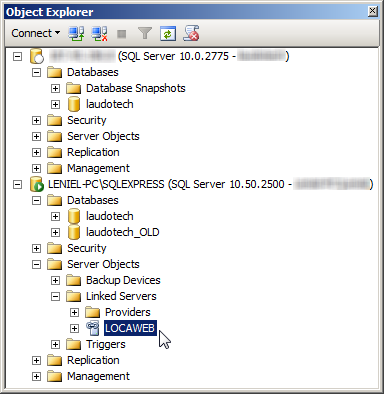 Figure 2 - SSMS Object Explorer and the Linked Server LOCAWEB in my local SQL Server Express instance





