My 1st year of Chemtech

On September 1st I completed 1 year at Chemtech.

Chemtech - A Siemens Company

So far I’ve worked on projects that demanded what I knew and what I didn’t know yet. This is the kind of thing I ever wanted. While I was looking for a job opportunity this was what I had in my mind.

The Computer Engineering graduation helped me to learn the basics so that I could be prepared to start working.

The real learning happens when you get to the market and start building real software that controls a huge industrial plant for example as is the case of a control panel that shows to the users the state of variables scattered across a huge industrial field consisting of a lot of machines and processes. Software that you build, test, homologate and deploy in production environment. Software that is built in partnership with the client - be it through e-mail, by phone or in person. This kind of thing gives you a valuable experience.

The projects I’ve worked on during this 1st year are the following:

Braskem - Control Panel
ASP.NET, C#, CSS, NHibernate, SQL, ORACLE, IIS

Braskem - Billing and Measurement System
ASP.NET, C#, CSS, NHibernate, Web service, SQL, ORACLE, IIS

Chemtech - Site (nicknamed chemsite)
Liferay, Java, CSS, SQL, MySQL, Tomcat

CSN - MES
VB 6, SQL, MS SQL Server

As you see I’ve used different technologies in each project. This strengthens your brain as you advance in the learning path and gives you the mindset you need to carry on so that you can work in the front line with more responsibilities and more exciting and engaging projects.

During 1 year I could learn a lot of things and made the difference constructing software products used by a lot of people (hey, take a look at the about me section at the top right side of the blog). See that I wrote a lot of people instead of millions of people. Someday I’ll achieve that "millions of people" :o)

Chemtech is a great company to work for. People are always ready and motivated to help you. Even my manager once in a while helps me. He sits by my side and starts coding with me! Everyone wins when one member of the group wins. This is the thought!

All in all, great company and great people together. That’s why Chemtech is making the difference in Brazil’s engineering scenario.

If you’re looking for an engineering job opportunity in Brazil, consider Chemtech. A company that thinks ahead of its time envisioning a great future for Brazil and the world.

I could enumerate lots of good points about Chemtech, but if you want to know more, go ahead and visit the chemsite. There you’ll find a bunch of information.

Despite a great start in my professional career I’ve passed through some life changing experiences as for example, moving from Volta Redonda to Rio de Janeiro. Wow, this moving has made me think about different aspects of life. Many things I thought before getting in Rio de Janeiro needed to be rethought. In the end you grow mentally, emotionally and spiritually. This is the time in life when everything you’ve learned has to be put in action.

All in all, I’m doing at Chemtech what I like to do and that’s all folks for my 1st year.

A big thanks to everyone who has helped me to get here. I won’t name anyone. I’ve known a lot of people. People that helped me a lot.  You know who you are.

Thanks Jesus for making real what I’ve asked you, for being with me all the time and for teaching, capacitating and advising me through this journey/endeavor.
Regex matching and naming groups in C#

Let’s say you have a string and want to match individual groups of characters within that string. How would you do that? That’s the question I asked myself.
The following code is the outcome of some research on how to get this done. It shows you how to capture/match and name groups of characters using a regex pattern.

class RegexGroupsNames
{
    public static void Main()
    {
        // String to be parsed
        string str = "777L777_333_4444_55555_22_20090926_1727_666666_999999999_1010101010";

        // Regex pattern
        // Here we define the groups that form our string according to our need.
        // Each group has a name so that it's easier to get the individual values.
        string pattern =
               @"(?<group1>\d{3}[A-Z]\d{3})_(?<group2>\d{3})_(?<group3>\d{4})_(?<group4>\d{5})_(?<group5>\d{2})_(?<group6>\d{8})_(?<group7>\d{4})_(?<group8>\d{6})_(?<group9>\d{9})_(?<group10>\d{10})";

        // Creating the Regex used to parse the string with the pattern defined above
        Regex regex = new Regex(pattern);

        // String is a match or not ?
        Console.WriteLine("{0} {1} a valid string.", str, Regex.IsMatch(str, pattern, RegexOptions.IgnoreCase) ? "is" : "is not");

        // Matching the string and getting the groups named above
        Match match = regex.Match(str);

        // Writing the values of each group
        Console.WriteLine("group1  = {0}", match.Groups["group1"].Value);
        Console.WriteLine("group2  = {0}", match.Groups["group2"].Value);
        Console.WriteLine("group3  = {0}", match.Groups["group3"].Value);
        Console.WriteLine("group4  = {0}", match.Groups["group4"].Value);
        Console.WriteLine("group5  = {0}", match.Groups["group5"].Value);
        Console.WriteLine("group6  = {0}", match.Groups["group6"].Value);
        Console.WriteLine("group7  = {0}", match.Groups["group7"].Value);
        Console.WriteLine("group8  = {0}", match.Groups["group8"].Value);
        Console.WriteLine("group9  = {0}", match.Groups["group9"].Value);
        Console.WriteLine("group10 = {0}", match.Groups["group10"].Value);
// Defining the Culture to show the DateTime IFormatProvider culture = new CultureInfo("en-US", true); // Creating a DateTime variable with the data contained within groups 6 and 7 DateTime dt = DateTime.ParseExact(match.Groups["group6"].Value + match.Groups["group7"].Value, "yyyyMMddHHmm", culture); Console.WriteLine(dt); } }

This is the string to be parsed:

"777L777_333_4444_55555_22_20090926_1727_666666_999999999_1010101010"

It has 10 parts “groups” separated by an underscore character ( _ ).

What we want to do is to extract each individual group so that we can manipulate it anyway we want.

To accomplish that we define a regex that has the following pattern:

@"(?<group1>\d{3}[A-Z]\d{3})_(?<group2>\d{3})_(?<group3>\d{4})_(?<group4>\d{5})_(?<group5>\d{2})_(?<group6>\d{8})_(?<group7>\d{4})_(?<group8>\d{6})_(?<group9>\d{9})_(?<group10>\d{10})";
Let’s dissect the regex…
The 1st group denoted by the first pair of round brackets ( ) will look for 3 digits \d{3} followed by an uppercase letter ranging from A through Z [A-Z] followed by another 3 digits \d{3}.
The 2nd group denoted by the second pair of parenthesis will look for 3 digits, the 3rd group will look for 4 digits, the 4th group will look for 5 digits and so on… I think you got the point! :- )
While playing with this I found an interesting thing, that is, you can give a name to each group. In this case, the name goes inside the angle brackets < > preceded by a question mark. I’ve given the name <group1> to the first group and just incremented the final number in the others.
Naming your groups is great because you can refer to them while manipulating the matched groups without having to remember the exact position inside the string. Instead of doing this:
// Writing the values of each group
Console.WriteLine(match.Groups[0].Value);
Console.WriteLine(match.Groups[1].Value);
Console.WriteLine(match.Groups[2].Value);
Console.WriteLine(match.Groups[3].Value);
Console.WriteLine(match.Groups[4].Value);
Console.WriteLine(match.Groups[5].Value);
Console.WriteLine(match.Groups[6].Value);
Console.WriteLine(match.Groups[7].Value);
Console.WriteLine(match.Groups[8].Value);
Console.WriteLine(match.Groups[9].Value);

We can do this:

// Writing the values of each group
Console.WriteLine(match.Groups["group1"].Value);
Console.WriteLine(match.Groups["group2"].Value);
Console.WriteLine(match.Groups["group3"].Value);
Console.WriteLine(match.Groups["group4"].Value);
Console.WriteLine(match.Groups["group5"].Value);
Console.WriteLine(match.Groups["group6"].Value);
Console.WriteLine(match.Groups["group7"].Value);
Console.WriteLine(match.Groups["group8"].Value);
Console.WriteLine(match.Groups["group9"].Value);
Console.WriteLine(match.Groups["group10"].Value);

Isn’t it cool!?

With this you can create your regex pattern and match the groups of characters that interest you the most.

Grouping enables you to work with separate sets of data. Naming each group enables you to refer to each one of them easily.

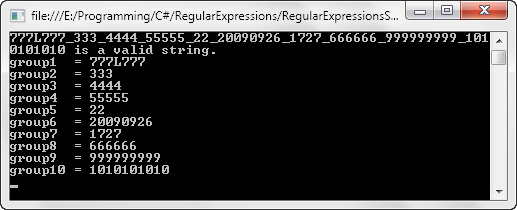
This is the output of the code:

Regular Expression Grouping and Naming

Hope this helps.

References
RegExLib.com - Regular Expression Library
http://regexlib.com/

Silverlight Regular Expression Tester
http://regexlib.com/RESilverlight.aspx

Java web crawler searcher robot that sends e-mail

This java crawler is extremely useful if you need to search a webpage for a specific word, tag or whatever you want to analyze in the data retrieved from a given URL.

I’ve used it for example to search for a specific error message that appeared in a page when a connection to the database could not be done. It helped me to prove that the error was really caused as a consequence of the connection link failure to the database.

The crawler saves in the file system the page that contains the string you’re searching for. The name of the file contains the time from when the string was found within the page body. With this information I could match the time information present on the file name with the time accompanying the error present in the web server log.

The code was originally developed by Rodrigo Gama that is a fellow developer/coworker of mine. I just adapted the code a little bit to fit my needs.

What’s the idea behind the crawler?
The main idea behind the crawler is the following:

You pass 2 essential parameters to run the application - these are the string you want to search for and the URLs you want to verify.

A thread for each URL is then created. This is done using the PageVerificationThread.java class that implements Runnable.

The PageVerificationThread creates a notificator object that is responsible for calling the MailSender object that in its turn sends a notification (message) to the emails you hardcoded in the Main.java class.

The message is also hardcoded inside the run() method of PageVerificationThread class.

I advise you to read the comments in the code.

You’ll have to change some strings in the code as is the case of the username and password used to send the e-mails.

The Code
The crawler has 4 classes: MailSender.java, Main.java, Notificator.java and PageVerificationThread.java.

This is the Main class:

/**
 * @authors Rodrigo Gama (main developer)
 *          Leniel Macaferi (minor modifications and additions)
 * @year 2009
 */

import java.net.MalformedURLException;
import java.util.ArrayList;
import java.util.List;

public class Main
{
    public static void main(String[] args) throws MalformedURLException
    {
        // URLs that will be verified
        List<String> urls = new ArrayList<String>();

        // Emails that will receive the notification
        String[] emails = new String[]
        { "youremail@gmail.com" };

        // Checking for arguments
        if(args == null || args.length < 2 || args[0] == null)
        {
            System.out.println("Usage: <crawler.jar> <search string> <URLs>");

            System.exit(0);
        }
        else
        {
            // Printing some messages to the screen
            System.out.println("Searching for " + args[0] + "...");
            System.out.println("On:");

            // Showing the URLs that will be verified and adding them to the paths variable
            for(int i = 1; i < args.length; i++)
            {
                System.out.println(args[i]);

                urls.add(args[i]);
            }
        }

        // For each URL we create a PageVerificationThread passing to it the URL address, the token to
        // search for and the destination emails.
        for(int i = 0; i < urls.size(); i++)
        {
            Thread t = new Thread(new PageVerificationThread(urls.get(i), args[0], emails));

            t.start();
        }
    }
}

This is the PageVerificationThread class:

/**
 * @authors Rodrigo Gama (main developer)
 *          Leniel Macaferi (minor modifications and additions)
 * @year 2009
 */

import java.io.BufferedReader;
import java.io.File;
import java.io.FileWriter;
import java.io.IOException;
import java.io.InputStreamReader;
import java.net.MalformedURLException;
import java.net.URL;
import java.net.URLConnection;
import java.util.Calendar;
import java.util.Properties;
import java.util.TimeZone;

public class PageVerificationThread implements Runnable
{
    private String                strUrl;
    private String                searchFor;
    private static Notificator    notificator = null;
    private static Object         lock        = new Object();
    private int                   numAttempts = 0;

    public PageVerificationThread(String strUrl, String searchFor, String[] emails)
    {
        this.strUrl = strUrl;
        this.searchFor = searchFor;

        synchronized(lock)
        {
            if(notificator == null)
            {
                notificator = new Notificator();

                // For each email, adds it to the notificator "to" list.
                for(int i = 0; i < emails.length; i++)
                {
                    notificator.addDesetination(emails[i]);
                }
            }
        }
    }

    public void run()
    {
        try
        {
            URL url = new URL(strUrl);

            // Time interval to rerun the thread
            float numMinutes = 1;

            while(true)
            {
                try
                {
                    Properties systemProperties = System.getProperties();
                    systemProperties.put("http.proxyHost",
                            "proxy.yourdomain.com");
                    systemProperties.put("http.proxyPort", "3131");
                    System.setProperties(systemProperties);

                    URLConnection conn = url.openConnection();
                    conn.setDoOutput(true);

                    // Get the response content
                    BufferedReader rd = new BufferedReader(
                            new InputStreamReader(conn.getInputStream()));
                   
                    String line;
                   
                    StringBuilder document = new StringBuilder();

                    // A calendar to configure the time
                    Calendar calendar = Calendar.getInstance();
                    TimeZone tz = TimeZone.getTimeZone("America/Sao_Paulo");
                    calendar.setTimeZone(tz);
                    calendar.add(Calendar.SECOND, 9);
                    String timeStamp = calendar.getTime().toString();

                    boolean error = false;

                    // For each line of code contained in the response
                    while((line = rd.readLine()) != null)
                    {
                        document.append(line + "\n");

                        // If the line contains the text we're after...
                        if(line.contains(searchFor))
                        {// "is temporarily unavailable."))
                            // {
                            error = true;
                        }
                    }

                    // System.out.println(document.toString());
                   
                    // If we found the token...
                    if(error)
                    {
                        // Prints a message to the console
                        System.out.println("Found " + searchFor + " on " + strUrl);

                        // Sends the e-mail
                        notificator.notify("Found " + searchFor + " on " + strUrl);

                        // Writing the file to the file system with time information
                        FileWriter fw = null;

                        try
                        {
                            String dir = "C:/Documents and Settings/leniel-macaferi/Desktop/out/" + strUrl.replaceAll("[^A-Za-z0-9]", "_") + "/";

                            File file = new File(dir);
                            file.mkdirs();
                            file = new File(dir + timeStamp.replaceAll("[^A-Za-z0-9]", "_") + ".html");
                            file.createNewFile();

                            fw = new FileWriter(file);
                            fw.append(document);
                        }
                        finally
                        {
                            if(fw != null)
                            {
                                fw.flush();
                                fw.close();
                            }
                        }
                    }

                    // If error we reduce the time interval
                    if(error)
                    {
                        numMinutes = 0.5f;
                    }
                    else
                    {
                        numMinutes = 1;
                    }

                    try
                    {
                        Thread.sleep((long) (1000 * 60 * numMinutes));
                    }
                    catch(InterruptedException e)
                    {
                        e.printStackTrace();
                    }

                    // A counter to show us the number of attempts so far
                    numAttempts++;

                    System.out.println("Attempt: " + numAttempts + " on " + strUrl + " at " + calendar.getTime().toString());
                }
                catch(IOException e)
                {
                    e.printStackTrace();
                }
            }
        }
        catch(MalformedURLException m)
        {
            m.printStackTrace();
        }
    }
}

This is the Notificator class:

/**
 * @author Rodrigo Gama
 * @year 2009
 */

import java.util.ArrayList;
import java.util.List;
import javax.mail.MessagingException;
import javax.mail.internet.AddressException;

public class Notificator
{
    private List<String>    to   = new ArrayList<String>();
    private String          from = "leniel-macaferi";

    public void addDesetination(String dest)
    {
        to.add(dest);
    }

    public synchronized void notify(String message)
    {
        try
        {
            // Sends the e-mail
            MailSender.sendMail(from, to.toArray(new String[] {}), message);
        }
        catch (AddressException e)
        {
            e.printStackTrace();
        }
        catch (MessagingException e)
        {
            e.printStackTrace();
        }
    }
}

This is the MailSender class:

/**
 * @authors Rodrigo Gama
 * @year 2009
 */

import java.util.Properties;
import javax.mail.Authenticator;
import javax.mail.Message;
import javax.mail.MessagingException;
import javax.mail.PasswordAuthentication;
import javax.mail.Session;
import javax.mail.Transport;
import javax.mail.internet.AddressException;
import javax.mail.internet.InternetAddress;
import javax.mail.internet.MimeMessage;

public class MailSender
{
    public static void sendMail(String from, String[] toArray,
            String messageText) throws AddressException, MessagingException
    {
        // Get system properties
        Properties props = System.getProperties();

        // Setup mail server (here we’re using Gmail) 
        props.put("mail.smtp.host", "smtp.gmail.com");
        props.put("mail.smtp.starttls.enable", "true");
        props.put("mail.smtp.auth", "true");

        // Get session
        Authenticator auth = new MyAuthenticator();
        Session session = Session.getDefaultInstance(props, auth);

        // Define message
        MimeMessage message = new MimeMessage(session);
        message.setFrom(new InternetAddress(from));

        for(int i = 0; i < toArray.length; i++)
        {
            String to = toArray[i];

            message.addRecipient(Message.RecipientType.TO, new InternetAddress(to));
        }

        message.setSubject("The e-mail subject goes here!");
        message.setText(messageText);

        // Send message
        Transport.send(message);
    }
}

class MyAuthenticator extends Authenticator
{
    MyAuthenticator()
    {
        super();
    }

    protected PasswordAuthentication getPasswordAuthentication()
    {
        // Your e-mail your username and password
        return new PasswordAuthentication("username", "password");
    }
}

How to use it?
Using Eclipse you just have to run it as shown in this picture:

Java Crawler Run Configuration in Eclipse

I hope you make good use of it!

Source Code
Here it is for your delight: http://leniel.googlepages.com/JavaCrawler.zip
